ホームに戻る
出典 :
関連 :
目次 :
依存関係プロパティ( DependencyProperty )とは
データバインディングのターゲットに指定できるプロパティ。
WPFの「依存関係プロパティシステム」はソース(プロパティ)の変更を通知し、ターゲット(依存関係プロパティ)に反映するという機構であり、データバインディングの根幹をなしている。
この依存関係プロパティシステムに参加できるプロパティが、依存関係プロパティである。
原則
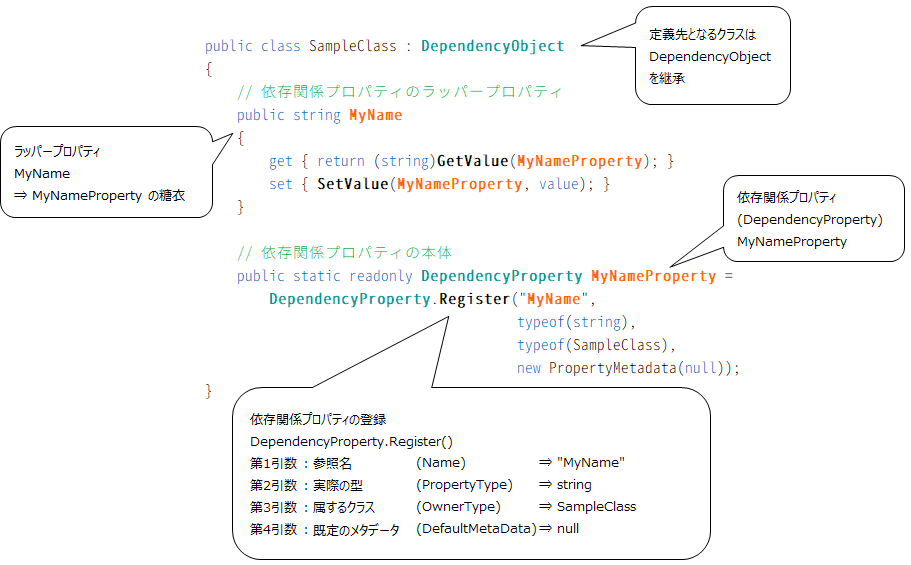
DependencyProperty を保有(登録)できるのは DependencyObject とその派生クラスに限定される。
(
DependencyObject は依存関係プロパティシステムに参加できるオブジェクトである。)
既存のUI要素(コントロールなど)は DependencyObject を継承しているため、明示的に継承を行う必要は無い。
また、UI要素の既存プロパティはすべて依存関係プロパティとして実装されているため、そのままデータバインディングのターゲットとすることができる。
依存関係プロパティの登録はメソッド
DependencyProperty.Register() を用いる。
依存関係プロパティ MyNameProperty に対し、Register() の第1引数は "MyName" となっているが、
これはXAMLから MyNameProperty を参照する際のエイリアス(別名)として機能する。
依存関係プロパティが保持する実際の値の取得は
DependencyObject.GetValue() 、更新は
DependencyObject.SetValue() を用いる。
ただこれでは煩雑なので、ラッパープロパティ( MyName )を定義し、通常のプロパティとしてアクセスできるようにしている。
参照名およびラッパープロパティを "○○" 、依存関係プロパティを "○○Property" と命名することが推奨されている。
Visual Studioでは組み込みスニペット
propdp を用いることで、雛型を呼び出すことができる。
実装例
以下、ユーザーコントロールでの使用例を挙げる。
ユーザーコントロールのコードビハインド : SampleControl.xaml.cs
public partial class SampleControl : UserControl
{
// #1 : 依存関係プロパティ TitleProperty の作成
public static readonly DependencyProperty TitleProperty =
DependencyProperty.Register( "Title",
typeof(string),
typeof(SampleControl),
new FrameworkPropertyMetadata( "Title", new PropertyChangedCallback(OnTitleChanged) ) );
// ラッパープロパティ Title の宣言
public string Title
{
get { return (string)GetValue(TitleProperty); }
set { SetValue(TitleProperty, value); }
}
// #2 : TitleProperty 変更時のコールバック定義
private static void OnTitleChanged(DependencyObject obj, DependencyPropertyChangedEventArgs e)
{
// オブジェクトを取得して処理する
SampleControl ctrl = obj as SampleControl;
if (ctrl != null)
{
ctrl.TitleTextBlock.Text = ctrl.Title;
}
}
// コンストラクタ
public SampleControl()
{
InitializeComponent();
Title = "Set Title Property";
}
}
ユーザーコントロールのXAML : SampleControl.xaml
<
UserControl x:Class=
"Sample.SampleControl"
xmlns=
"http://schemas.microsoft.com/winfx/2006/xaml/presentation"
xmlns:x=
"http://schemas.microsoft.com/winfx/2006/xaml"
xmlns:mc=
"http://schemas.openxmlformats.org/markup-compatibility/2006"
xmlns:d=
"http://schemas.microsoft.com/expression/blend/2008"
mc:Ignorable=
"d"
d:DesignHeight=
"50" d:DesignWidth=
"300">
<
Grid>
<!-- TitleProperty の反映先となる TextBlock -->
<
TextBlock Name=
"TitleTextBlock" Text=
"Set Title Property"/>
</
Grid>
</
UserControl>
ウィンドウのViewModel : MainWindowViewModel.cs
class MainWindowViewModel : WindowViewModelBase
{
// #3 : データバインディング用のプロパティ
public string TitleStr
{
get { return GetDataBindItem<string>("TitleStr").Value; }
private set { GetDataBindItem<string>("TitleStr").Value = value; }
}
// コンストラクタ
public MainWindowViewModel()
{
CreateDataBindItem<string>("TitleStr", "Depedency Property Test");
}
}
ウィンドウのView : MainWindow.xaml
<
Window
xmlns=
"http://schemas.microsoft.com/winfx/2006/xaml/presentation"
xmlns:x=
"http://schemas.microsoft.com/winfx/2006/xaml"
xmlns:local=
"clr-namespace:DependencPropertyTest"
x:Class=
"Sample.MainWindow"
Title=
"MainWindow" Height=
"350" Width=
"525">
<
Window.Resources>
<!-- ViewModelをリソースとして生成 -->
<
local:MainWindowViewModel
x:Key=
"ViewModel" />
</
Window.Resources>
<
Grid DataContext=
"{StaticResource ViewModel}">
<!-- #4 : 作成した SampleControl の "Title" にViewModelのプロパティを "TitleStr" としてバインドする -->
<
local:SampleControl
Title=
"{Binding TitleStr}" />
</
Grid>
</
Window>
このとき、DependencyProperty.Register の第1引数はバインディング時の参照名( "Title" )、
第4引数は TitleProperty の初期値および、変更時のコールバックである。
OnTitleChanged() は TitleProperty が変更された際に呼ばれるコールバックメソッドである( #2 )。
TitleProperty が変更されると OnTitleChanged() が呼ばれ、TextBlock.Text に値を反映する。
ウィンドウのViewModelにはプロパティ TitleStr を作成しており( #3 )、これはデータバインディングのソースとして用いる( #4 )。
ターゲットは SampleControl の "Title" であるが、これはラッパープロパティ Title ではなく依存関係プロパティ TitleProperty を指すことに注意が必要である。
動作は以下のようになる。
- MainWindow で DataContext の TitleStr (バインドソース)を変更する
- バインドターゲットである SampleControl.TitleProperty が連動して変更される
- 2. により、OnTitleChanged() が呼ばれるため、TitleTextBlock.Text が更新される
ラッパープロパティを介して依存関係プロパティ同士をバインドすることも可能であるが、詳細は割愛する。
異なる DependencyObject に依存関係プロパティを付与できる機構。詳細は当該記事を参照。